Dreamy Room Level 490
Level 490 guide walkthrough, helping players solve puzzles and explore the wonderful world of Dreamy Room.
Dreamy Room Level 490 Walkthrough Guide
Dreamy Room Level 490 Room Story
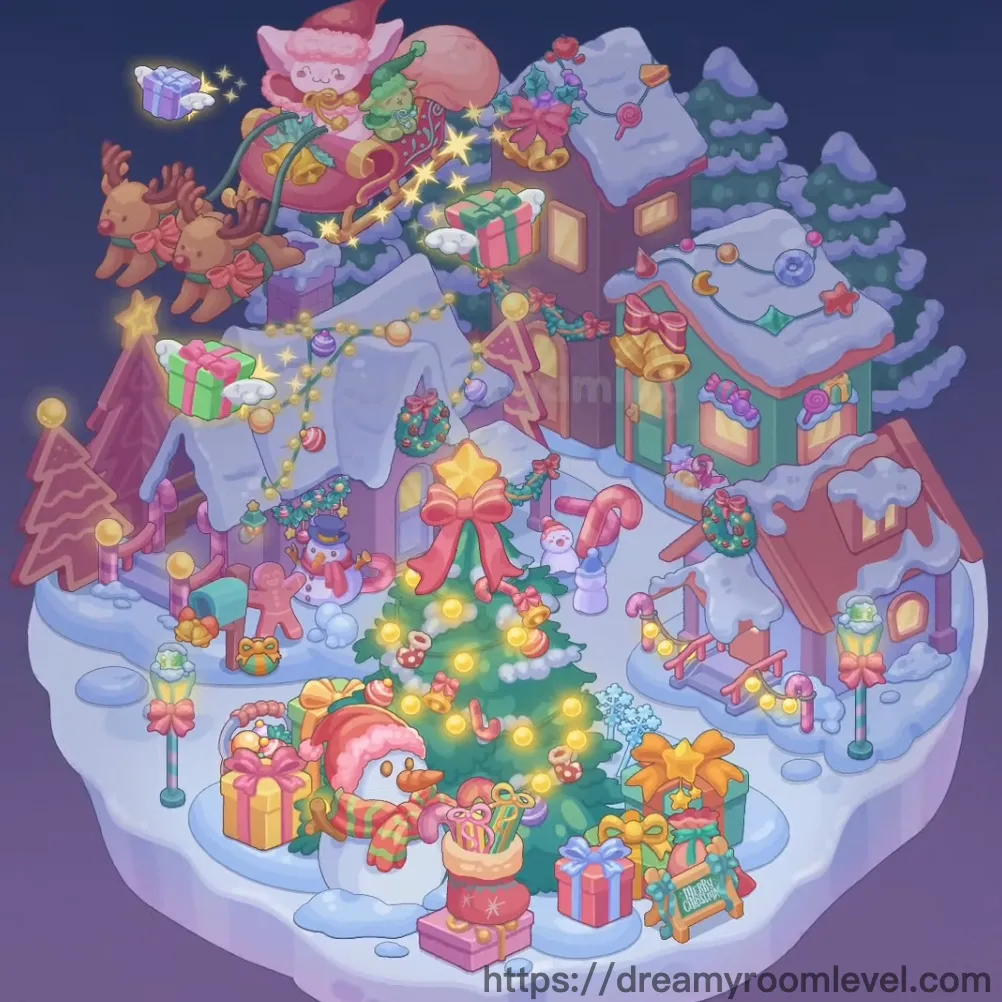
Welcome to Dreamy Room Level 490, a magical Christmas village floating among the stars on a snowy winter night. Santa and his adorable reindeer soar through the sky in a golden sleigh filled with gifts, spreading holiday cheer across the colorful village below. Cozy houses in purple, green, and brown huddle together with snow-covered rooftops, while a magnificent Christmas tree glows at the center surrounded by beautifully wrapped presents. This enchanting Dreamy Room Level 490 captures the wonder of Christmas Eve, where snowmen wave cheerfully, candy canes dot the landscape, and every corner sparkles with festive magic.
Dreamy Room Level 490: Step-by-Step Placement Guide
Step 1. Position the Snowy Island Base
Place the snowy island base as the foundation for Dreamy Room Level 490. This white snowy platform with purple-tinted edges floats against the night sky.
Step 2. Build the Purple House in Dreamy Room Level 490
Position the purple house on the left side of the village. This lavender cottage with snow-covered roof becomes a cozy corner of the Christmas scene.
Step 3. Add the Brown Tall Building
Place the brown tall building in the upper center area. This multi-story structure with warm glowing windows towers over the village in Dreamy Room Level 490.
Step 4. Position the Green House in Dreamy Room Level 490
Set the green house on the right side of the village. This teal-colored home with golden bell decorations adds cheerful color to the scene.
Step 5. Add the Brown Cottage
Place the brown cottage near the green house on the right. This small cozy house features wreaths and holiday decorations for Dreamy Room Level 490.
Step 6. Position the Gingerbread House in Dreamy Room Level 490
Set the gingerbread house on the far left edge. This brown triangular structure with wavy icing details adds sweet charm to the village.
Step 7. Add Snowy Rooftops
Cover all houses with snowy rooftops featuring thick white snow layers. The snow sits heavily on each roof in Dreamy Room Level 490's winter wonderland.
Step 8. Install House Windows and Doors in Dreamy Room Level 490
Place the house windows on each building with warm golden glow. Add house doors at ground level of each cottage.
Step 9. Position Santa's Sleigh
Place the santa sleigh flying in the upper left sky area. This ornate golden and pink sleigh soars above the village in Dreamy Room Level 490.
Step 10. Add Flying Reindeer in Dreamy Room Level 490
Position the flying reindeer in front of the sleigh. These two brown reindeer with red bow collars pull Santa through the night sky.
Step 11. Place Santa Character
Set the santa character sitting in the sleigh. This cute pink Santa with red hat waves cheerfully over Dreamy Room Level 490's village.
Step 12. Add Gift Sack in Dreamy Room Level 490
Position the gift sack in the back of Santa's sleigh. This large red bag overflows with colorful presents ready for delivery.
Step 13. Position the Christmas Tree
Place the magnificent christmas tree in the center front of the village. This large green tree becomes the focal point of Dreamy Room Level 490.
Step 14. Add Tree Star Topper in Dreamy Room Level 490
Position the tree star topper at the peak of the Christmas tree. This golden star shines brightly atop the festive centerpiece.
Step 15. Decorate with Tree Lights
Wrap tree lights around the Christmas tree branches. The warm glowing bulbs illuminate the tree for Dreamy Room Level 490's celebration.
Step 16. Add Tree Ornaments in Dreamy Room Level 490
Hang tree ornaments throughout the tree branches. Colorful balls in gold, pink, and red decorate every level of the tree.
Step 17. Position Red Bow Decoration
Place the large red bow decoration on the front of the Christmas tree. This oversized bow adds elegant finishing touch to Dreamy Room Level 490.
Step 18. Add Christmas Wreaths in Dreamy Room Level 490
Hang christmas wreath decorations on house doors and walls. These green wreaths with red bows adorn multiple buildings.
Step 19. Position Golden Bells
Hang golden bells on rooftops and near doorways. These shiny bells add festive cheer to Dreamy Room Level 490's village houses.
Step 20. Add Holly Decorations in Dreamy Room Level 490
Place holly decorations on rooftops and building corners. The red berries and green leaves bring traditional holiday spirit.
Step 21. String Up Festive Lights
Drape string lights between buildings and along rooflines. Colorful bulbs connect the houses in Dreamy Room Level 490's glowing display.
Step 22. Position Candy Canes in Dreamy Room Level 490
Place candy canes throughout the village ground and near houses. These red and white striped treats stand tall as decorations.
Step 23. Add Lollipop Decorations
Set lollipop decorations near the houses and pathways. These swirled candy ornaments add sweet whimsy to Dreamy Room Level 490.
Step 24. Place Large Snowman in Dreamy Room Level 490
Position the snowman large near the purple house on the left. This cheerful snowman with hat and scarf greets visitors warmly.
Step 25. Add Small Snowman
Place the snowman small near the center of the village. This cute mini snowman stands near the candy canes in Dreamy Room Level 490.
Step 26. Position Gingerbread Man in Dreamy Room Level 490
Set the gingerbread man near the Christmas tree area. This brown cookie character with frosting details waves happily.
Step 27. Arrange Gift Boxes Stack
Create the gift boxes stack around the Christmas tree base. Multiple wrapped presents pile up for Dreamy Room Level 490's gift display.
Step 28. Add Colorful Gift Boxes in Dreamy Room Level 490
Place the pink gift box, green gift box, and yellow gift box scattered around the tree and village square.
Step 29. Position Flying Gift Box
Set the flying gift box floating near Santa's sleigh in the sky. These magical presents with wings drift through Dreamy Room Level 490.
Step 30. Add Santa Boot in Dreamy Room Level 490
Place the santa boot near the gift pile in the center. This red boot overflows with small presents and treats.
Step 31. Position Merry Christmas Sign
Set the merry christmas sign on the right side of the village. This wooden sign welcomes visitors to Dreamy Room Level 490.
Step 32. Add Gift Bag in Dreamy Room Level 490
Place the gift bag near the presents area. This decorative sack holds additional holiday surprises.
Step 33. Install Street Lamps
Position the street lamp posts around the village pathways. These glowing lamps illuminate the snowy streets of Dreamy Room Level 490.
Step 34. Add Bow Lamp Post in Dreamy Room Level 490
Set the bow lamp post with red ribbon decoration near the houses. This festive light adds holiday charm to the village.
Step 35. Position Mailbox
Place the mailbox near the purple house on the left. This green mailbox awaits letters to Santa in Dreamy Room Level 490.
Step 36. Add Pink Fence in Dreamy Room Level 490
Install the pink fence sections around the left side of the village. These candy-colored railings border the gingerbread area.
Step 37. Position Wooden Sled
Place the wooden sled on the right side near the snow. This pink sled sits ready for winter fun in Dreamy Room Level 490.
Step 38. Add Snow Piles in Dreamy Room Level 490
Scatter snow pile mounds throughout the village ground. These white snow drifts add winter atmosphere.
Step 39. Create Ice Pond
Position the ice pond area in the center-right of the village. This frozen surface reflects the festive lights of Dreamy Room Level 490.
Step 40. Add Snowflake Decorations in Dreamy Room Level 490
Place snowflake decorations floating near buildings and pathways. These blue crystal shapes add magical winter details.
Step 41. Position Pine Trees
Set the pine trees in the background behind the houses. These tall evergreens frame the village scene in Dreamy Room Level 490.
Step 42. Add Snowy Pine Trees in Dreamy Room Level 490
Place snowy pine trees with white snow on branches throughout the background. These frost-covered trees complete the winter forest.
Step 43. Add Sparkle Effects
Scatter sparkle effects around the sleigh and gift areas. These golden stars and glitter add magic to Dreamy Room Level 490.
Step 44. Position Cloud Wisps in Dreamy Room Level 490
Place the cloud wisps drifting across the night sky. These soft white clouds float past Santa's sleigh.
Step 45. Complete Night Sky Background
Ensure the night sky background frames the entire scene. The deep purple gradient sky completes Dreamy Room Level 490's magical Christmas Eve atmosphere.
Notes and Tips
Important Notes
- Santa's sleigh and reindeer float in the upper left requiring precise sky placement
- Multiple houses overlap in the background creating layered placement challenges
- The Christmas tree is densely decorated with many small ornaments to position
- Gift boxes are scattered extensively requiring careful arrangement around the tree
- Flying gift boxes and sparkle effects need exact positioning in the sky area
Practical Tips
- Start with the snowy island base and build houses from back to front
- Complete all house structures before adding rooftop decorations and snow
- Position Santa's sleigh early as reference point for flying elements
- Place the Christmas tree centrally then surround with gift boxes systematically
- Use zoom when adding small decorations like ornaments and candy canes
- Save sparkle effects and cloud wisps for final atmospheric touches
- Mastering Dreamy Room Level 490 requires patience with the dense holiday decorations and multiple layered elements