Dreamy Room Level 522
Level 522 guide walkthrough, helping players solve puzzles and explore the wonderful world of Dreamy Room.
Dreamy Room Level 522 Walkthrough Guide
Dreamy Room Level 522 Room Story
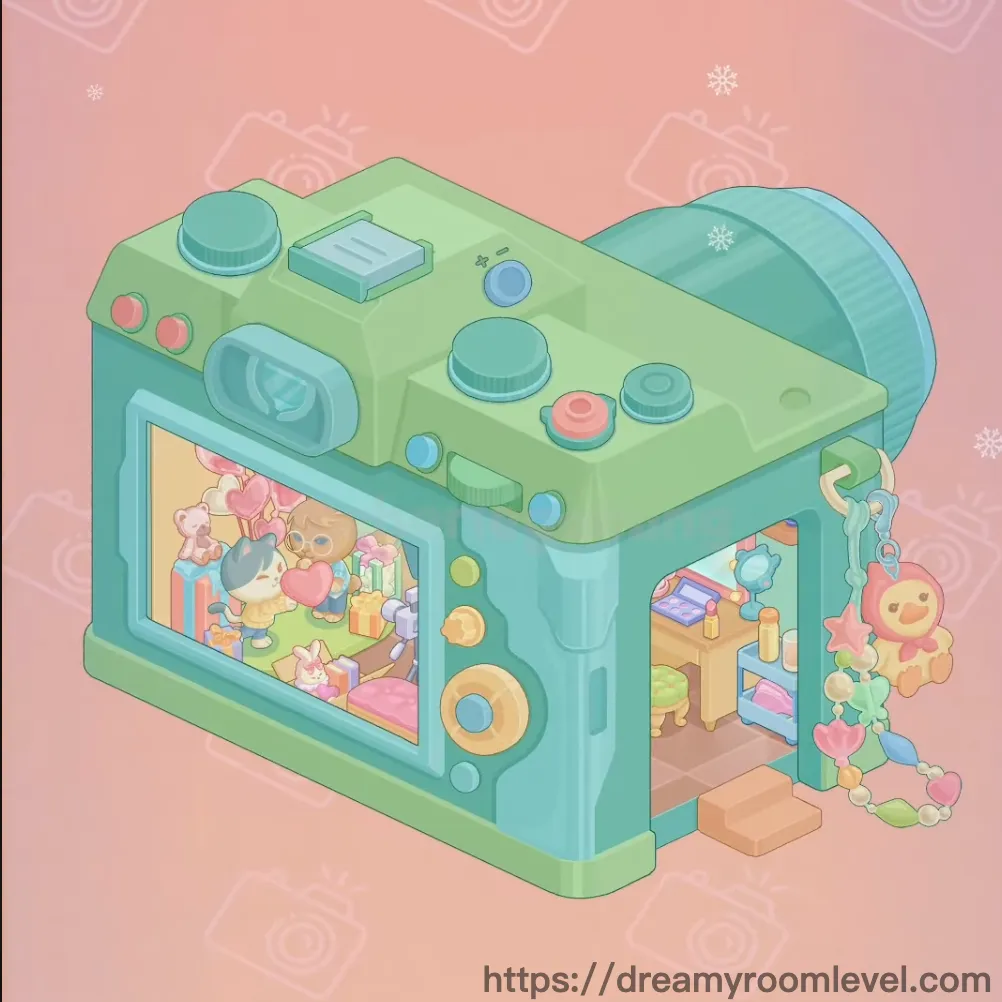
Inside a whimsical camera-shaped boutique, adorable animal customers browse the latest accessories. The shop owner has transformed a giant vintage camera into the perfect retail space, where the viewfinder becomes a window and buttons serve as decorative accents. Bunny friends try on colorful bags and hats while a brown cat admires the makeup display. The arched shelf showcases plush pillows and character bags, while a ring light illuminates the vanity corner. This Dreamy Room Level 522 treasure is where photography meets fashion, creating a picture-perfect shopping experience where every accessory tells a story and style comes into focus.
Dreamy Room Level 522: Step-by-Step Placement Guide
Step 1. Lay the Brown Tile Floor
Place the Brown Tile Floor as the base covering the entire ground area. This checkered floor pattern creates the foundation for the camera-shaped shop in Dreamy Room Level 522.
Step 2. Build the Green Walls
Position the Green Wall Left, Green Wall Right, and Green Wall Back to create the mint green interior walls. Add the Teal Ceiling on top following Dreamy Room Level 522 design principles.
Step 3. Build the Camera Body Structure
Place the Camera Body Green and Camera Body Teal to form the main camera exterior. These pieces create the distinctive camera shape that houses the accessories shop.
Step 4. Add Camera Lens and Viewfinder
Install the Camera Lens on the front of the camera body. Position the Camera Viewfinder on top. Add the Camera Flash to complete the camera's front features in this Dreamy Room Level 522 challenge.
Step 5. Install Camera Controls
Place the on the upper surface. Position the Camera Dial Left and Camera Dial Right on the top panel. Add the , , and as functional camera controls.
Step 6. Add Camera Screen and Strap
Install the Camera Screen on the back of the camera body, displaying the shop interior. Attach the Camera Strap with the Keychain Charm hanging from it following Dreamy Room Level 522 layout requirements.
Step 7. Install the Accessories Sign
Mount the Accessories Sign above the entrance. Place the Green Sign Board behind it, clearly identifying the shop's purpose in this level.
Step 8. Position the Arched Display Shelf
Place the Arched Display Shelf on the back wall. This curved wooden shelf serves as the main product display area in the accessories shop.
Step 9. Fill the Display Shelf
Arrange the Shelf Items Top Row, Shelf Items Middle Row, and Shelf Items Bottom Row on the arched shelf. These colorful accessories create an attractive product display in Dreamy Room Level 522.
Step 10. Add Paw Print Pillows
Place the Paw Print Pillow Pink and Paw Print Pillow Yellow on the display shelf. These cute pillows add charm to the product selection.
Step 11. Display Character Bags and Hats
Position the Star Hat Blue on the shelf. Add the Pink Bunny Bag, Yellow Bear Bag, and Purple Elephant Bag as featured accessories following Dreamy Room Level 522 design principles.
Step 12. Install Wall Shelf
Mount the Wall Shelf Right on the right wall. Place the Camera Display, Phone Display, and Cactus Pot on this shelf.
Step 13. Set Up the Vanity Table
Position the Vanity Table against the wall. Add the Vanity Drawers as part of the table structure. Place the Mirror on top of the vanity in this level.
Step 14. Add Makeup Supplies
Place the Makeup Brush Holder on the vanity. Fill it with Makeup Brushes. Add the Perfume Bottle Green and Perfume Bottle Blue on the vanity surface following Dreamy Room Level 522 requirements.
Step 15. Add Storage Units
Position the Blue Storage Unit on the floor. Place the Pink Fabric Storage on the lower shelf, providing organized storage for accessories.
Step 16. Install Clothing Rack
Place the Clothing Rack in the shop area. Hang the Blue Dress on the rack. Add the Yellow Hat and Orange Bow as clothing accessories in this Dreamy Room Level 522 challenge.
Step 17. Add the Pink Bench
Position the Pink Bench in the center area. Place the Coffee Cup on or near the bench, creating a comfortable seating area for customers.
Step 18. Install Photography Equipment
Set up the Ring Light for product photography. Position the Camera Tripod and Studio Light to create a professional photo setup following Dreamy Room Level 522 design principles.
Step 19. Add Customer Characters
Place the Bunny Customer Pink and Bunny Customer Yellow browsing the shop. Position the Cat Customer Brown near the vanity area, creating a lively shopping scene.
Step 20. Add Flower Decorations
Position the Pink Flower Decoration Left and Pink Flower Decoration Right outside the shop entrance. These blooms add a welcoming touch in this level.
Step 21. Install the Door
Place the Door Teal at the shop entrance. Add the Door Handle to complete the entryway. Position the Window Display beside the door following Dreamy Room Level 522 requirements.
Step 22. Add Small Decorative Items
Place the Bunny Keychain as a small accessory. Position the Yellow Box Package visible in the first image. Add the Perfume Bottle Floor as a decorative element.
Step 23. Add Final Atmospheric Effects
Scatter the Camera Icons Background in the pink background area. Add the Snowflakes throughout the scene, completing the magical atmosphere of Dreamy Room Level 522.
Tips and Notes
Important Notes
- The camera body structure must be assembled first before adding interior shop elements in Dreamy Room Level 522
- Camera controls (buttons, dials) need precise positioning on the top surface to match the camera design
- The arched display shelf should be placed before filling it with products to avoid placement conflicts
- Small accessories like keychains and perfume bottles can be easily overlooked on shelves and tables
- Customer characters need to be positioned naturally as if browsing or shopping
- The camera screen on the back shows the interior, so interior placement affects the external view
Practical Tips
- Start with the floor and walls, then build the camera exterior before adding interior elements in Dreamy Room Level 522
- Place large furniture (vanity, storage units, clothing rack) first, then add smaller accessories
- Arrange the arched shelf items from top to bottom for easier organization
- Position photography equipment (ring light, tripod) in corners to avoid blocking pathways
- Layer the display shelf densely with colorful products to create an appealing retail atmosphere
- Use the vanity area as a focal point by arranging makeup items neatly
- Place customer characters in natural shopping poses near products they might be interested in
- The camera strap and charm should hang naturally from the camera body exterior
- Ensure the door and window display are aligned properly at the entrance for a welcoming appearance