Dreamy Room Level 507
Level 507 guide walkthrough, helping players solve puzzles and explore the wonderful world of Dreamy Room.
Dreamy Room Level 507 Walkthrough Guide
Dreamy Room Level 507 Room Story
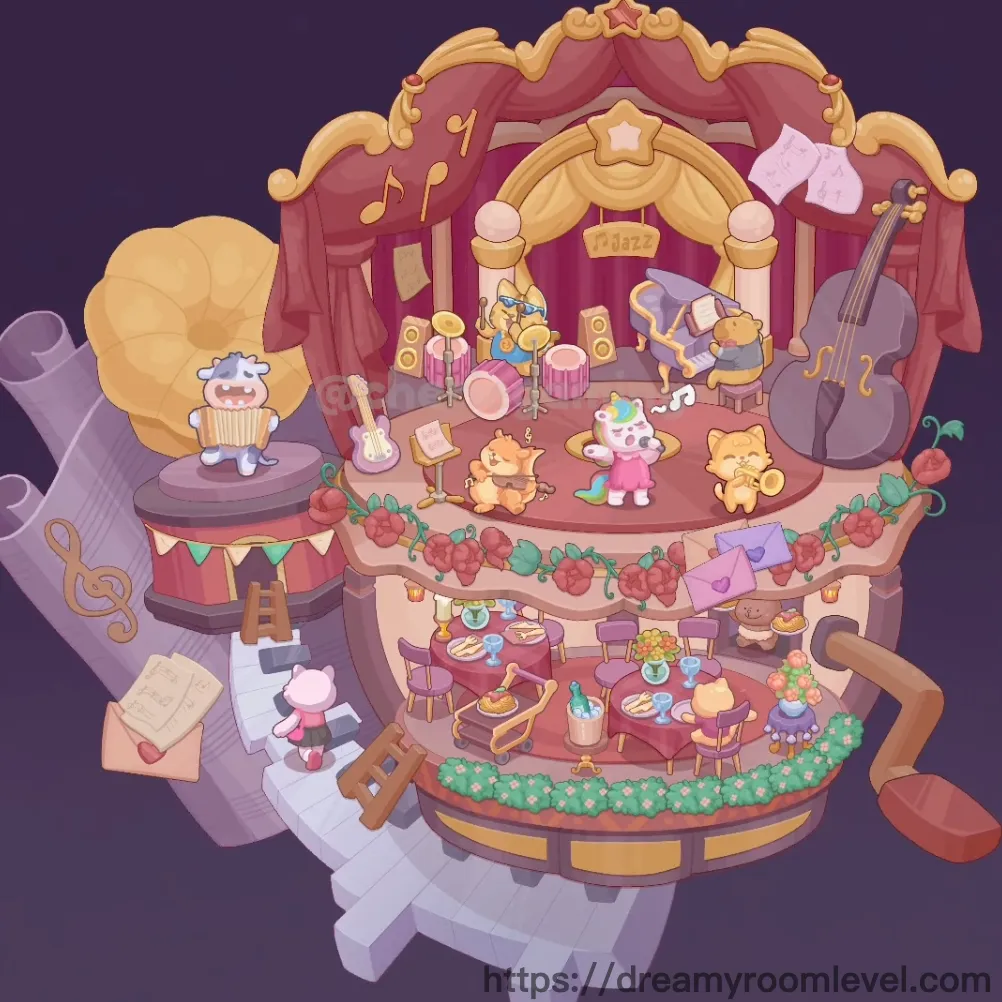
Inside a magical rotating music box, a charming jazz ensemble performs on a grand three-tiered stage where music and dining blend in perfect harmony. The top level features talented animal musicians playing beneath red velvet curtains and golden arches, while the middle tier hosts an elegant restaurant adorned with roses and twinkling lights. Below, stairs lead guests to this enchanting performance space. This is Dreamy Room Level 507, where every rotation brings new melodies and the joy of music fills the air in this whimsical musical carousel.
Dreamy Room Level 507: Step-by-Step Placement Guide
Step 1. Build Purple Circular Base
Position the purple circular base as the foundation with decorative geometric patterns. Add golden border trim around the perimeter in Dreamy Room Level 507.
Step 2. Install Support Pillar and Platforms
Place the support pillar center extending vertically through all levels. Add rotating platform bottom, rotating platform middle, and rotating platform top.
Step 3. Add Red Stage Curtain and Backdrop
Install the red stage curtain forming the theatrical background. Position the golden arch backdrop creating the ornate stage frame.
Step 4. Mount Jazz Sign Banner in Dreamy Room Level 507
Place the at the top center of the stage displaying "Jazz" in golden letters beneath a star decoration.
Step 5. Add Star Decoration
Position star decoration top at the peak of the stage arch adding a sparkling focal point to the performance area.
Step 6. Set Up Drum Set
Place the drum set pink on the left side of the top stage including drums, cymbals, and stands creating the rhythm section.
Step 7. Position Keyboard Instrument in Dreamy Room Level 507
Set the keyboard instrument in the center-right area of the stage with piano keys ready for performance.
Step 8. Add Electric Guitar
Place the electric guitar on the stage floor with guitar strings visible, ready for the guitarist.
Step 9. Install Microphone Stand and Speakers
Position microphone stand center stage with microphone cord. Add speaker left and speaker right for sound amplification.
Step 10. Position Cat Character Guitarist in Dreamy Room Level 507
Place the cat character guitarist wearing sunglasses standing with the electric guitar, ready to perform.
Step 11. Add Bear Character Pianist
Position the bear character pianist in purple attire sitting at the keyboard instrument playing melodies.
Step 12. Place Rabbit Character Drummer
Set the rabbit character drummer behind the drum set with drumsticks in hand keeping the beat.
Step 13. Add Cow Character Audience Member
Position the cow character audience on the middle platform enjoying the performance with colorful attire.
Step 14. Place Pig Character Bottom in Dreamy Room Level 507
Set the pig character bottom on the lower level near the entrance welcoming guests to the music box.
Step 15. Arrange Dining Tables
Position dining table left, dining table right, and dining table center on the middle restaurant level.
Step 16. Add Wooden Chairs
Place multiple wooden chair brown around each dining table with chair cushion for comfortable seating.
Step 17. Set Food Plates and Tea Cups in Dreamy Room Level 507
Position food plate with meals on tables. Add tea cup for beverages and table centerpiece decorations.
Step 18. Add Flower Vases and Rose Garlands
Place flower vase pink on tables. Drape rose garland decoration with red rose cluster around the middle platform edge.
Step 19. Add Green Vine and Leaf Decorations
Position green vine decoration and green leaf cluster intertwining with roses creating natural beauty.
Step 20. Hang Colorful Pennant Flags in Dreamy Room Level 507
String colorful pennant flags across the middle platform creating a festive carnival atmosphere.
Step 21. Install White Staircase
Place the staircase white on the bottom level providing access to the upper platforms of the music box.
Step 22. Position Large Cello Instrument
Set the cello instrument large on the right exterior as a decorative oversized musical element.
Step 23. Add Saxophone Decoration
Position the saxophone decoration on the left side as another large-scale instrument accent surrounding the music box.
Step 24. Scatter Music Notes and Symbols in Dreamy Room Level 507
Add floating music notes floating throughout the air. Place sheet music paper, treble clef symbol, and triangle instrument.
Step 25. Add Purple Curtain Drapes
Hang purple curtain drape elements around the stage creating theatrical elegance.
Step 26. Install Stage Lighting and Details
Add stage light orb for illumination. Position golden ornament detail, decorative ribbon, and music stand.
Step 27. Complete Floor Patterns in Dreamy Room Level 507
Install stage floor pink on the performance level. Add restaurant floor tile on the dining tier and floor pattern decorative throughout.
Step 28. Add Final Platform Details
Position platform edge detail and base platform edge. Place yellow box decoration completing the music box in Dreamy Room Level 507.
Tips and Tricks
Important Notes
- The three rotating platforms must be stacked precisely on the center support pillar before adding furniture and characters in Dreamy Room Level 507
- Musical instruments should be positioned before placing character musicians to ensure proper placement and avoid overlap issues
- The red stage curtain requires the golden arch backdrop to be installed first for proper layering and visual depth
- Small items like tea cups and food plates can easily be hidden behind characters or furniture, check all table surfaces carefully
- Rose garlands must wrap around the middle platform edge continuously - ensure proper alignment to avoid gaps
- Character musicians have specific instrument pairings - cat with guitar, bear with keyboard, rabbit with drums
Practical Tips
- Start construction from the bottom platform upward to the top stage, maintaining proper vertical alignment throughout
- When arranging dining tables on the middle level, space them evenly in a circle to create balanced restaurant seating in Dreamy Room Level 507
- The drum set, keyboard, and guitar should be positioned in a semi-circle on stage to create a realistic band formation
- Position the large exterior instruments (cello and saxophone) after completing the interior to frame the music box properly
- Colorful pennant flags should be strung in a curved line following the circular platform edge for natural draping
- For the rose and vine decorations, place the base garland first, then add individual rose clusters and leaves along its length
- Music notes and symbols float at different heights - vary their placement throughout the air space for dynamic visual effect in Dreamy Room Level 507